
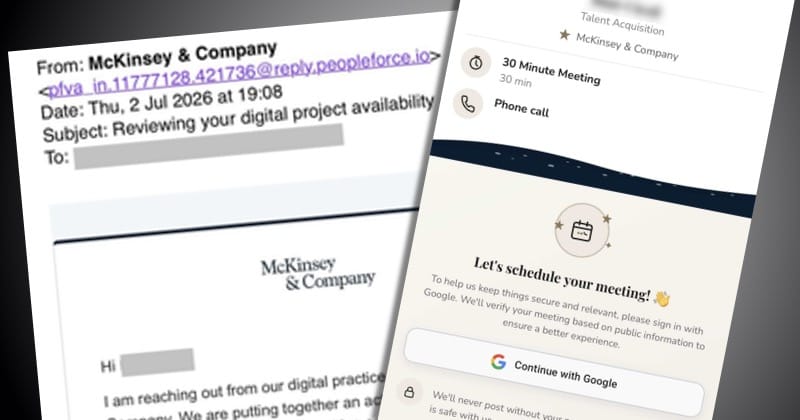
Fake Job Offers from Netflix and OpenAI Are Trying to Steal Your Google Password
Scammers are sending realistic job interview invitations to trick people into giving away their Google account passwords and personal information.
Source
Graham Cluley
Original headline: Invited to a “job interview” with Netflix or OpenAI? Beware! Your Google password could be at risk
Plain-English summary by GetCyberRight. Read the full report at the source above.
Cybercriminals are sending convincing fake job recruitment emails that appear to come from well-known companies like Netflix, OpenAI, and Adobe. These emails invite recipients to interview for marketing positions and other attractive roles. The goal is to trick people into clicking links that lead to fake login pages designed to steal Google passwords and other personal information. The scam uses realistic branding and professional language to appear legitimate. Anyone with a publicly visible email address could receive these fake recruitment emails. This includes people who have posted resumes online, those with LinkedIn profiles, or anyone whose email appears on professional websites or social media. If you click the links in these emails and enter your Google password on the fake pages, scammers will capture your login credentials. They can then access your email, documents, photos, and potentially other accounts linked to your Google account.
If you have received a recruitment email that seems too good to be true, take these steps immediately:
- Do not click any links in unsolicited job offer emails.
- If you already clicked a link and entered your password, change your Google password right now by going directly to google.com (not through the email link).
- Enable two-factor authentication on your Google account by visiting your Google Account security settings.
- Check your Google account activity for any suspicious logins from unfamiliar locations. If you see anything unusual, sign out of all sessions and change your password again. To verify whether a job offer is real, visit the company's official website directly by typing the address into your browser. Look for their careers page and search for the position mentioned in the email. You can also call the company's main phone number to ask if the recruitment email is legitimate. Real recruiters will not mind you verifying their identity. Going forward, be skeptical of unsolicited job offers, especially those that require you to log in through email links. Legitimate companies typically direct applicants to official career portals. Use two-factor authentication on all important accounts, including email, banking, and social media. This adds an extra layer of protection even if someone obtains your password. Remember that if an opportunity seems unusually exciting or urgent, that is often a red flag for a scam.
Curated from trusted cybersecurity sources by GetCyberRight
Source: Graham CluleyStay ahead of cyber threats
Get our free weekly digest. Real threats, plain language, what to do about them. No spam, ever.
More articles

Europol Responds to Claims About Police Databases: What It Means for Privacy
News reports claimed Europol operated secret databases outside legal rules. Europol says these claims are incorrect and based on misunderstandings.
2 min readEuropean Police Agency Addresses Database Concerns
Europol responded to online reports about how it manages data, clarifying that claims about improper databases are based on misunderstandings.
2 min read_Pattara_Alamy.jpg?width=720&quality=80&disable=upscale)
Why AI Agents Need Different Security Than Regular Software Accounts
Organizations are treating AI agents like regular service accounts, creating security gaps that could affect your workplace and personal data.
4 min read
AI Phishing Isn't Smarter. It's Faster and Knows Too Much About You.
A new AI phishing tool creates thousands of personalized attacks per hour, each one tailored to your recent activity and communication patterns.
4 min read